

Optimizing the USAJOBS Resume Builder to meet job seeker and reviewer needs

Overview
USAJOBS’ Resume Builder allows users to create and save resumes for federal job applications using their profile information. As the lead designer, I worked to improve its usability for job seekers while ensuring clarity for resume reviewers. Two stages of research, including interviews and usability testing with both user groups, identified key pain points of the Resume Builder tool such as navigation challenges, unclear instructions, and formatting limitations, and assessed the readability of the resumes it generates. Improvements were implemented by the end of the 2025 fiscal year, along with updates to support the presidential mandate limiting federal application resumes to two pages.
My Role
UX Design
UX Research
Data Analysis
Workshop facilitation
Project management
Tools
Word
Figma
Teams
UserTesting
Miro
Institution
U.S. Office of Personnel Management - USAJOBS
Team
Staff Acquisition Group HR Specialist, USAJOBS Customer Experience team, Verint Usability Analyst
Period
September 2023 - September 2025

Background
Why use the USAJOBS Resume Builder?
The USAJOBS Resume Builder allows federal job applicants to create resumes within the platform as an alternative to uploading their own. The tool has been retained because it offers several key advantages:
Federal jobs often require more detailed information than private-sector positions, and the tool ensures that all required fields are completed.
The tool can prefill resume content using information from the user’s USAJOBS profile.
Resumes made with the tool can be easily copied and customized for different job applications.
Some hiring managers prefer USAJOBS-generated resumes, as noted in job announcements.
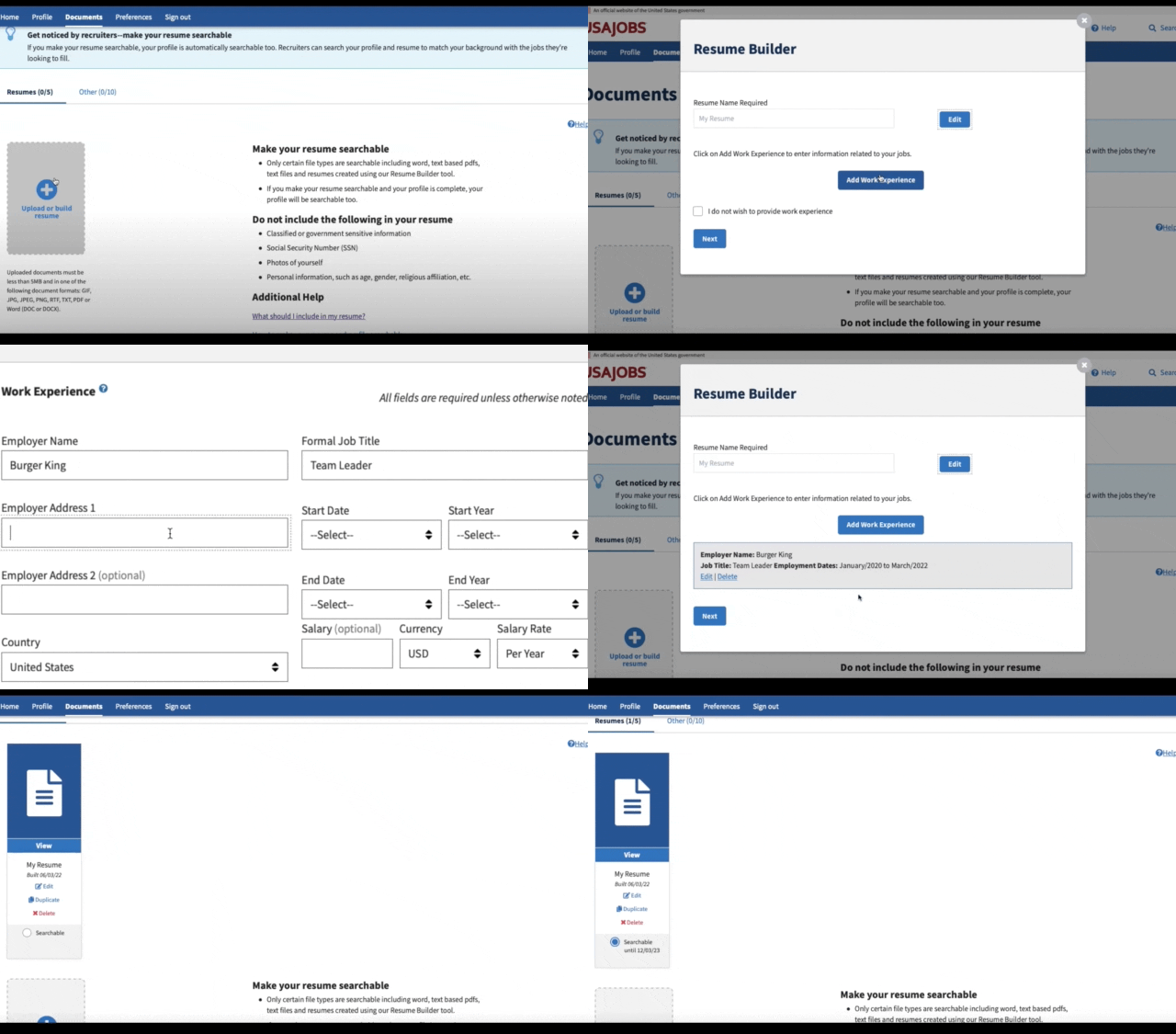
A quick demo of the old Resume Builder tool
A revamp driven by standardization
Despite its intended benefits, the Resume Builder was rarely used unless required for an application, as many applicants were unaware of its purpose and preferred using resumes created outside the platform. Its unclear value and persistent usability issues such as poor formatting, site timeouts, and bugs, further limited adoption.
An update became critical to increase usage and standardize the output of the Resume Builder. The tool had been converting user information into XML files, which caused inconsistent layouts, formatting errors, and data loss across federal HR applications. To address these issues and ensure consistency across all applications, the program office mandated replacing XML with a standardized PDF template, creating an opportunity to revamp the tool, improve usability, and better align it with user needs.
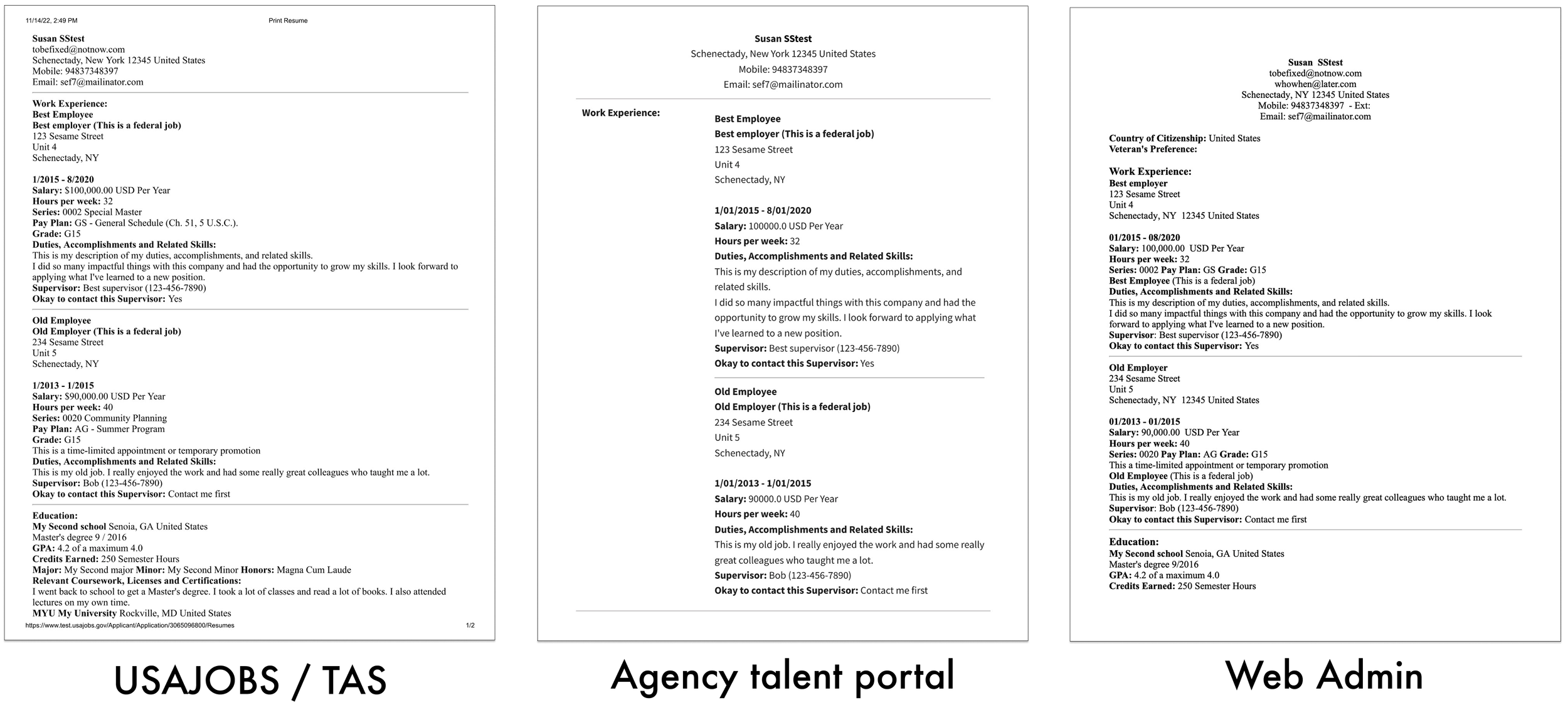
Resumes made with the Builder Resume displayed inconsistently across federal HR applications, prompting standardization.
Modernizing the Resume Builder in two stages for resume reviewers and job seekers
Stage 1: Standardizing the generated resume template
The project first focused on redesigning the look of the resume generated by the tool to enhance readability and consistency across all platforms. A combination of interviews and usability testing with resume reviewers evaluated a new PDF resume template designed to clarify content, improve hierarchy, optimize layout, and align with private-sector resume formats.
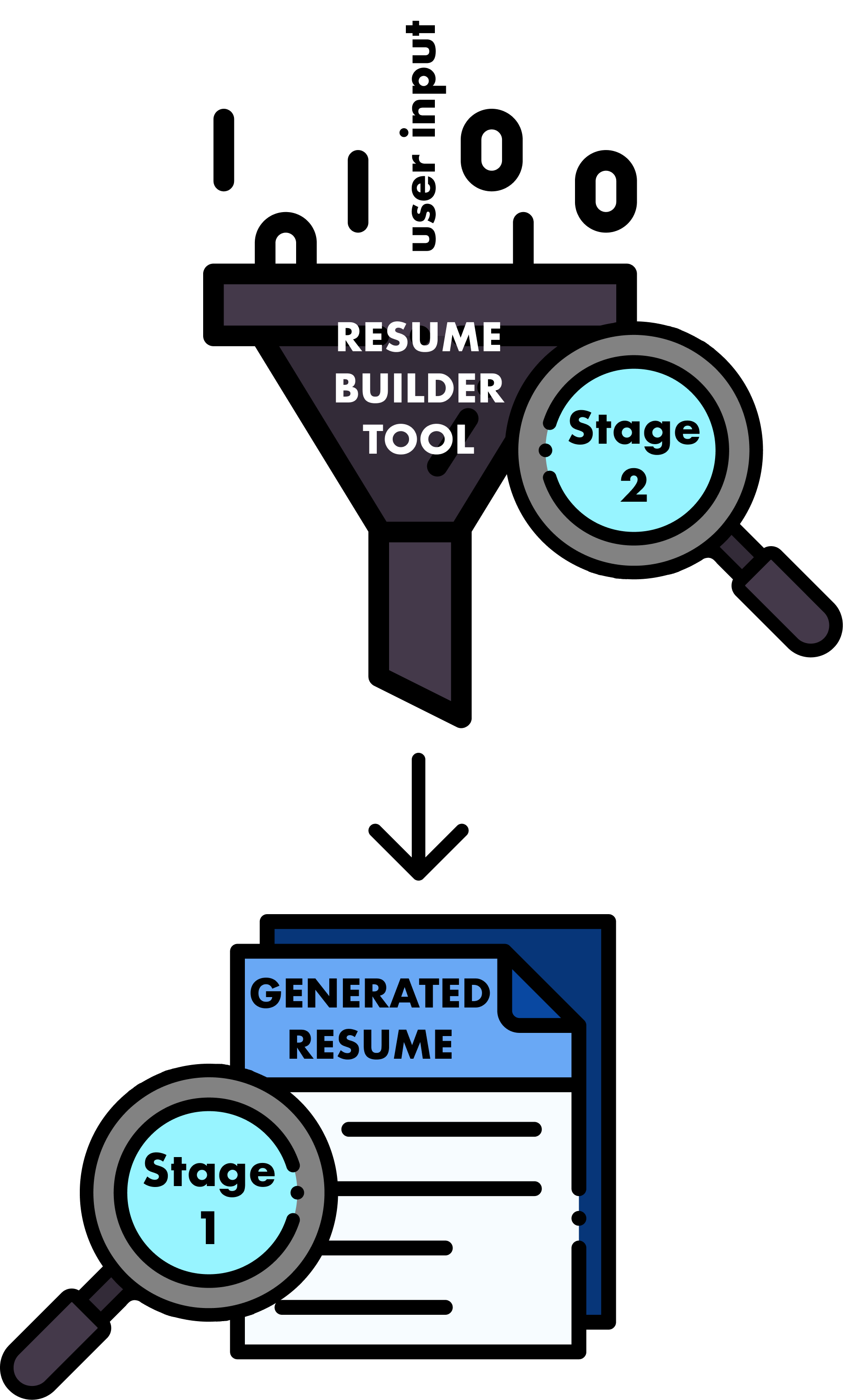
Stage 2: Improving the Resume Builder tool
After stage 1, the project tackled the low usage of the tool by job seekers. Satisfaction surveys and help desk reports identified usability challenges, including a lack of awareness about the tool’s benefits. Testing with job seekers aimed to improve guidance and messaging to encourage adoption, while identifying additional usability issues and friction points that hindered engagement.

Stage 1 process - Standardizing the generated resume template
(September - November 2023)
1. Discovery
Understanding federal resume requirements and the resume reviewer’s reading behaviors from the subject matter expert
An HR specialist from the Staff Acquisition Group served as the subject matter expert for the resume review process in this project. They confirmed that the current template’s poor readability, due to XML rendering, was hindering the HR specialist and hiring managers in quickly assessing candidates for job positions. The redesigned template needed to maintain scannability while improving organization.
The subject matter expert identified unnecessary fields for qualification review that could be removed, such as country of citizenship, veteran’s preference, and salary. They also emphasized that work experience and education should be easy to read during the typical resume review process:
-
Reviewers first confirm whether the applicant meets mandatory qualifications for the job, such as specialized experience or education.
-
Work Experience is reviewed to assess the relevance of duties to the job qualifications. Timeframe and specialized experience are key factors. If Education is required, it’s reviewed with supporting documents like transcripts.
-
For jobs that require certifications or other credentials, secondary sections like Job Training, Languages, Publications, and References are reviewed.
Researching resume best practices to improve readability and usability
To inform the redesign, I also conducted a comparative analysis of common resume templates from platforms such as Indeed, LinkedIn, the National Resume Writers’ Association (NRWA), the Professional Association of Resume Writers & Career Coaches (PARW/CC), and university career center guidelines. These insights helped guide the layout, content hierarchy, and styling of the new template, ensuring it was familiar to job seekers and optimized for hiring staff.

2. Design
Building the first design iteration to test
I reviewed the existing, poorly organized resume templates, which displayed information as a single long list, and compared them with best practices to identify key issues. These issues were addressed in the first design iteration to improve readability and navigation:
Excessive white space → Reduced white space and added page breaks to improve layout efficiency.
Unclear section divisions → Created a more structured layout with clearly separated and underlined sections.
Difficult-to-scan dates → Placed dates next to job titles for quicker visual scanning.
Insufficiently emphasized section headers → Enlarged section headers for easier navigation.
Unnecessary fields for qualification review → Removed fields such as country of citizenship, veteran’s preference, and salary, following the subject matter expert’s suggestions.
Page numbers were also added to the design to support an upcoming two-page limit requirement for resumes.
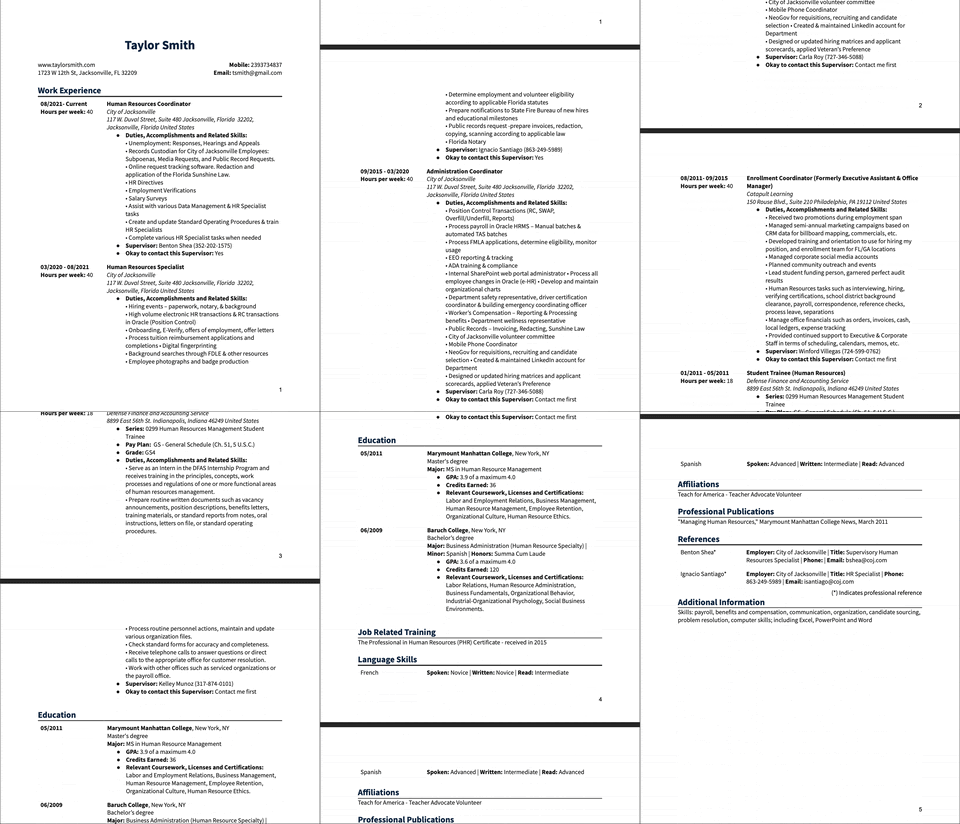
The first design iteration created in Microsoft Word
3. Testing and iteration
Assessing the Builder Resume’s readability and scanability with resume reviewers
To determine whether the new design improved the resume reviewer’s ability to quickly and accurately assess applicant qualifications, we focused on the following research questions:
Does the visual hierarchy guide attention effectively?
Does the new template improve information intake?
What information do hiring staff prioritize?
Do they read beyond key sections (Work Experience, Education, Job-Related Training)?
Semi-structured interviews and remote usability testing via Microsoft Teams were conducted with 9 hiring professionals—7 HR specialists and 2 hiring managers—recruited through the Customer Experience team’s and subject matter expert’s recommended contacts. All participants regularly reviewed resumes but varied in terms of experience, agency representation, the types of positions they hired for, the number of resumes reviewed per position, and the number of candidates they selected.
This study was done solely with resume reviewers rather than job seekers, as job seekers do not read Builder Resumes for hiring decisions. Instead, job seekers were included in the research stage 2 aimed at improving the Resume Builder tool based on their feedback.
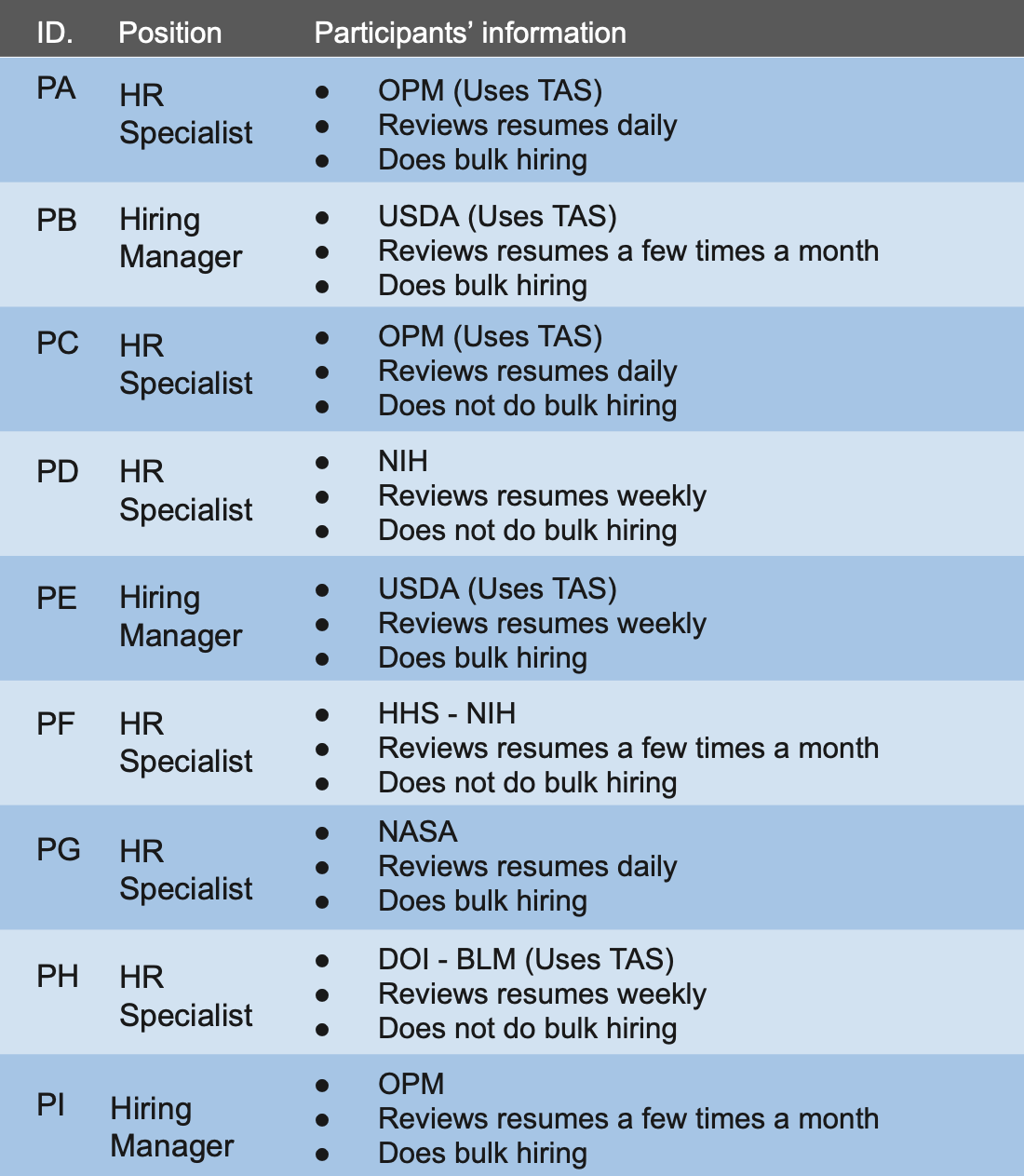
Participant profiles table
Delivering the final solutions and moving to the next stage
After the usability testing, a report of the findings and final proposed solutions were presented at the program level and approved for development. While this research focused on improving the Builder Resume template, it also uncovered issues with how the Resume Builder tool collects applicant information. These findings were documented for the next stage of the Resume Builder tool redesign.

Stage 2 process - Improving the Resume Builder tool
(April - October 2024)
1. Discovery and define
Gathering Resume Builder-related issues reported by users
I reviewed the USAOBS site customer feedback surveys managed by the Customer Experience team to identify the following key issues related to the Resume Builder:
Automatic sign-outs that make editing difficult
Failure to save progress
Preparing the live site for testing
Developers determined that the issues identified through customer feedback were caused by bugs and the Resume Builder being built on a modal component, which is not designed to function as a form or handle large amounts of information. The product team decided to fix the bugs and move sections out of the modal component so the minimally iterated live Resume Builder tool could be tested.
2. Testing and iteration
Scoping to improve job seekers’ experience
The live-site usability test aimed to evaluate how easily users could locate the Resume Builder, create resumes, and understand features such as copying and searchability, focusing on the following research questions:
What are job seekers' initial impressions of the Resume Builder?
How easily and quickly do job seekers navigate and complete their resumes?
What actions do job seekers take when encountering setbacks?
Building on stage 1 of the resume template research, I included an assessment of how job seekers understood the guidance for the highly important work experience and education sections into the research script as well.
Executing the research plan with Verint and UserTesting
After developing the research plan and participant screener, I conducted the moderated usability tests of the Resume Builder tool in partnership with a usability analyst from Verint, a company that provides usability testing and survey services to support customer satisfaction surveys. The analyst carried out the tests following my script using UserTesting, a platform for running and recording moderated user research sessions.
Each session lasted up to 30 minutes and was conducted in two rounds, focusing on form entry, navigation, and overall ease of use.
A total of 16 public participants who reported infrequent or no use of USAJOBS.gov participated, evenly split across both rounds. They represented diverse backgrounds, including students, armed forces personnel, and volunteers (e.g., Peace Corps, AmeriCorps VISTA), offering a broad range of work experiences. Findings from the first round informed adjustments in the second, including additional questions about user expectations and resume searchability.
During Stage 2 usability testing, job seekers confirmed the effectiveness of the Stage 1 redesign as well. They noted that the non-redesigned template felt was difficult to read and requested features like right-aligned dates and centered names, which the Stage 1 redesign had incorporated.
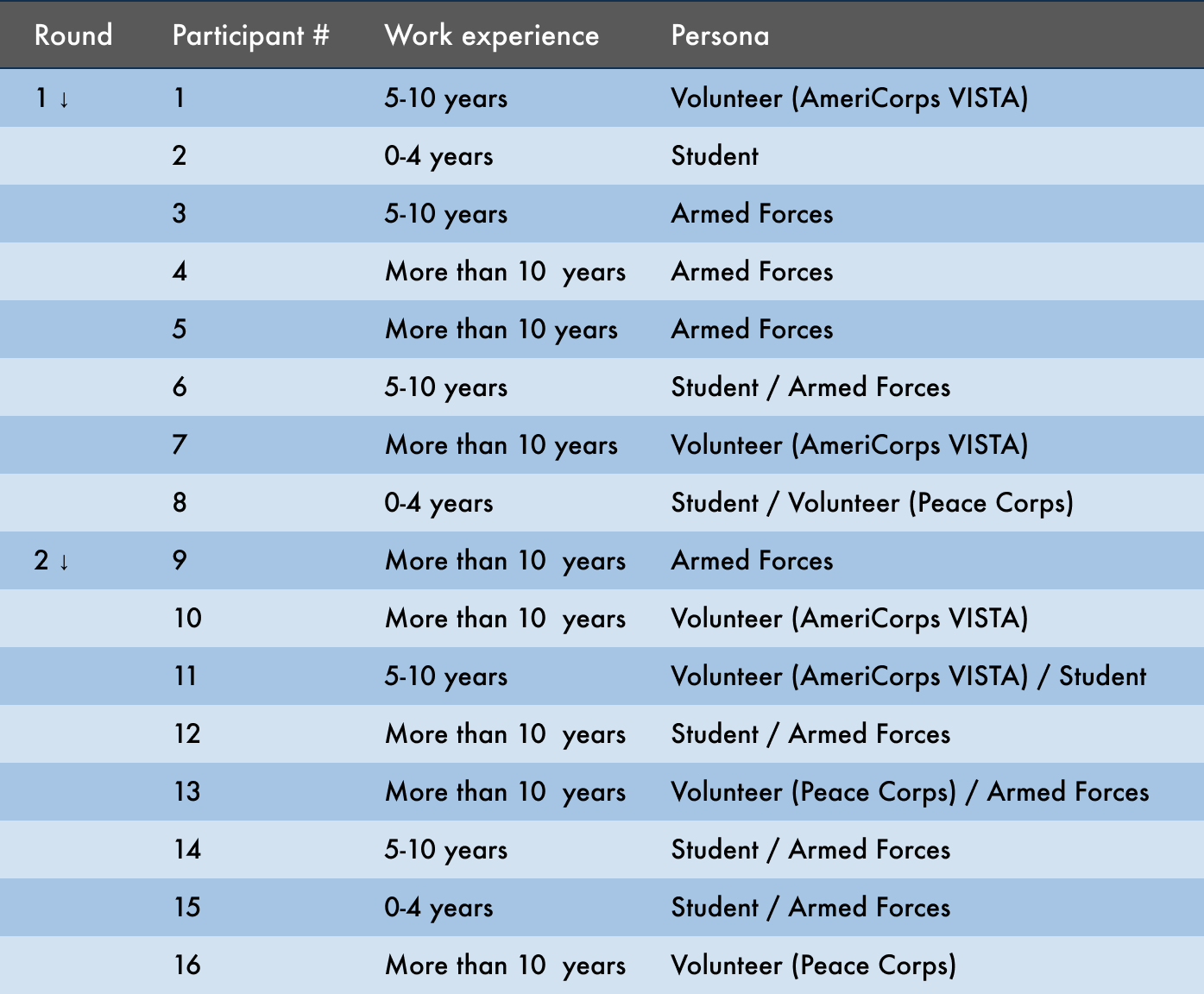
Participant profiles table
Prioritizing actionable solutions
Findings and recommendations from rounds 1 and 2 were shared with the program team as they were completed. The product team of product owners, business analysts, and developers reviewed the effectiveness and feasibility of my suggestions. I led a solution prioritization workshop, guiding the team to categorize each issue/solution as a quick fix, a new feature, or out of scope based on technical considerations or upcoming features. For example, user requests for more design controls over the resume template were deemed out of scope due to the upcoming two-page resume limit feature. Issues not out of scope were prioritized using an impact–effort matrix, from immediate actions to longer-term improvements.
Following prioritization, some updates were implemented immediately, while others were delivered later in 2025 as part of the two-page resume limit updates.
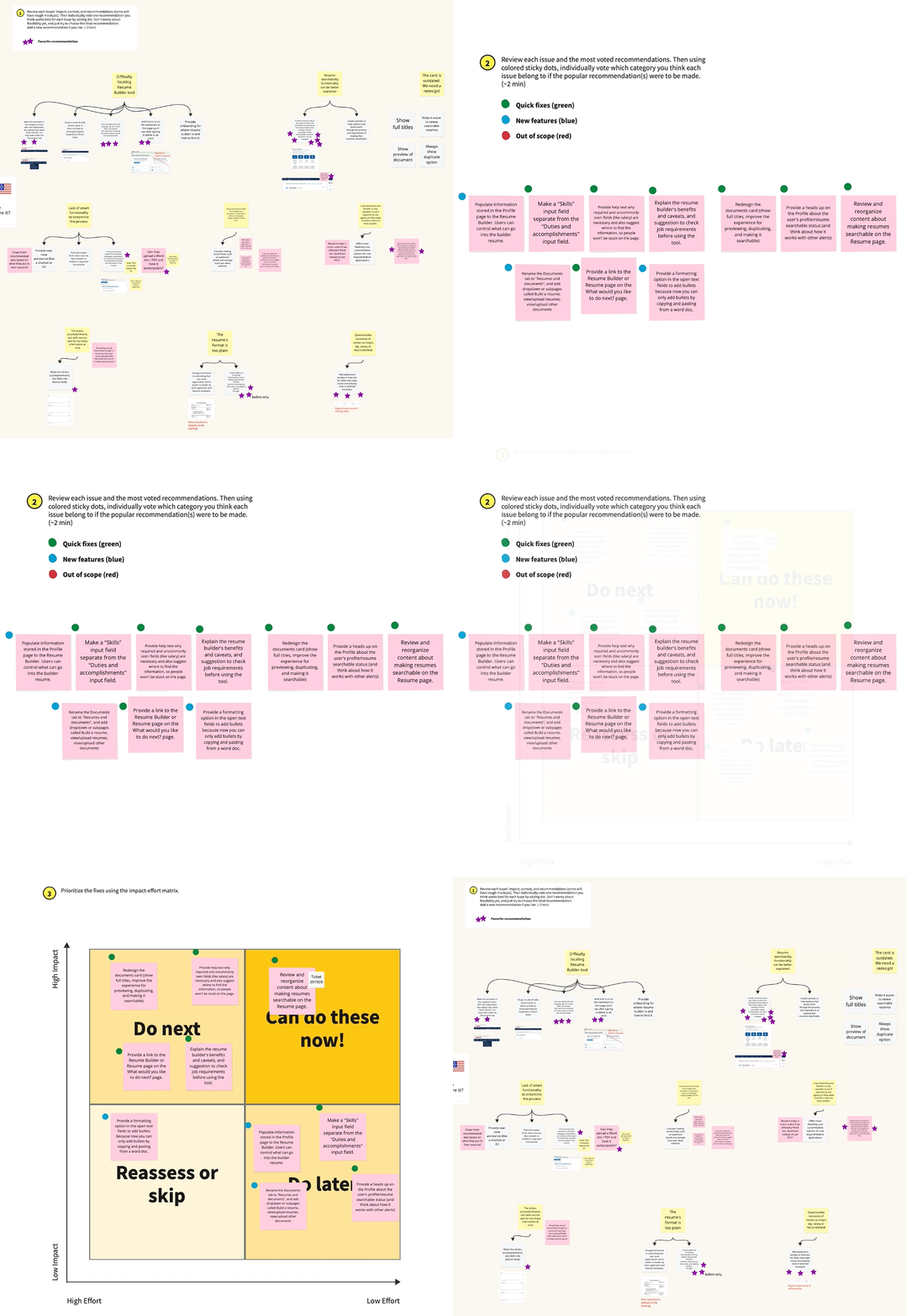
Solution prioritization activity boards
Redesigned resume template
The following key changes were implemented based on feedback from resume reviewers during testing of the initial design.
Change 1. Streamline sections
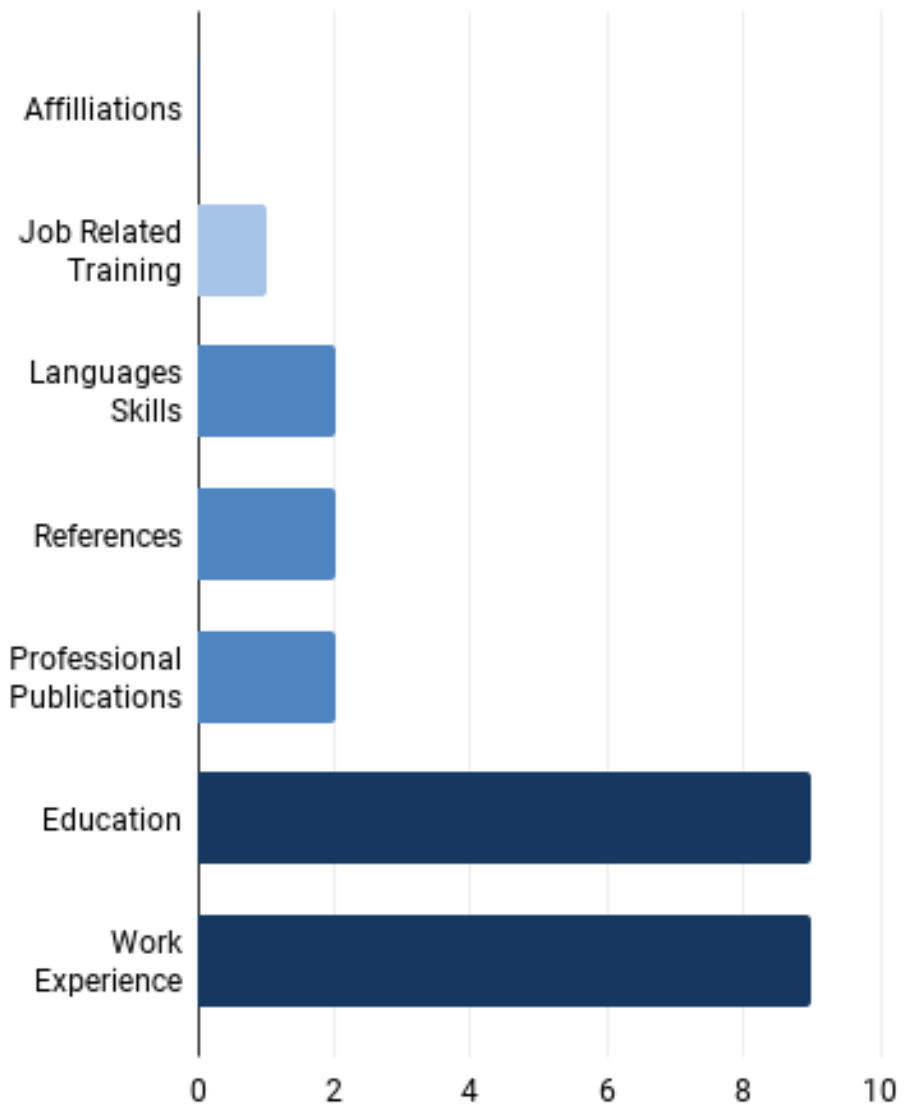
Table of resume reviewers’ votes on sections they read.
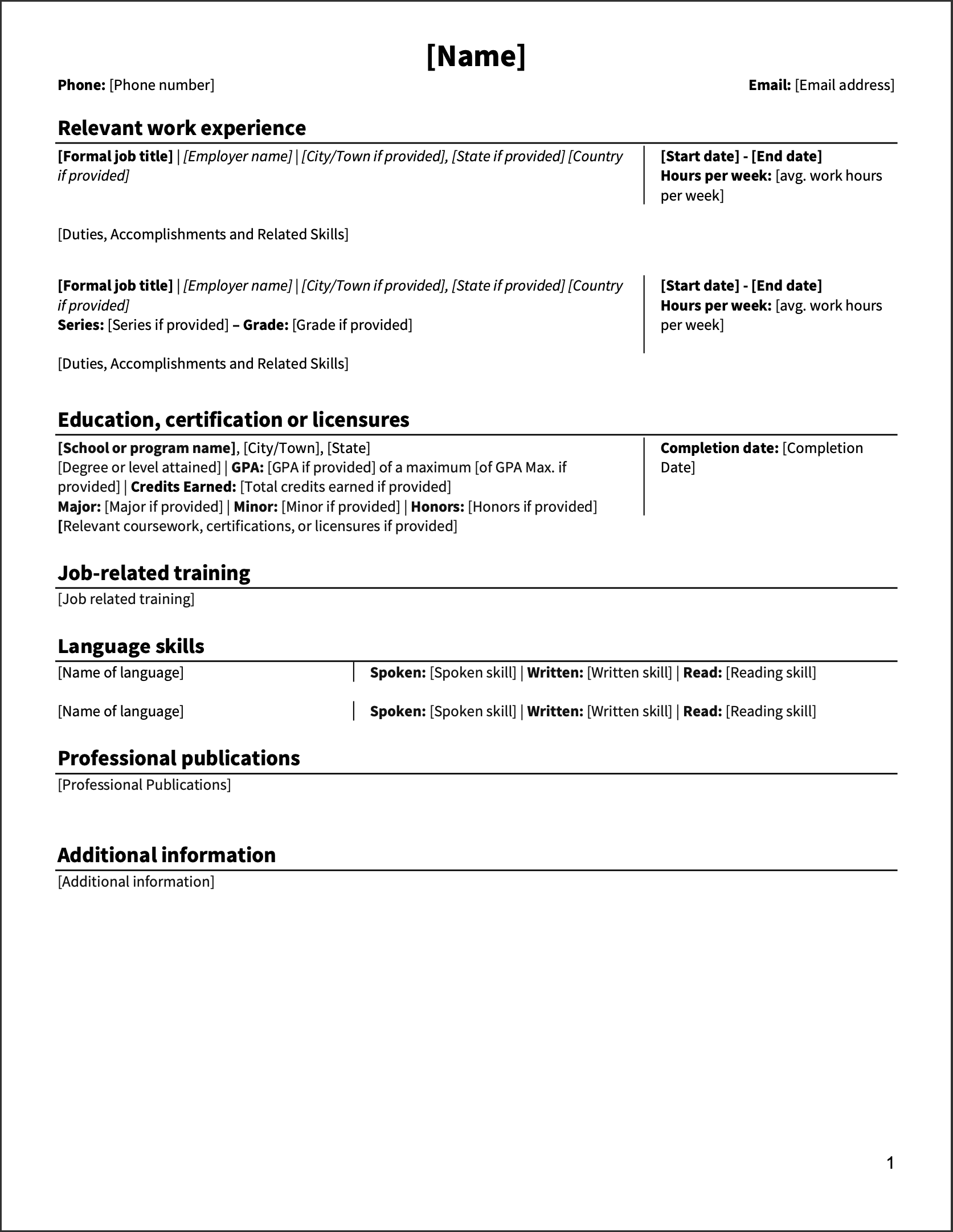
Final redesigned resume template with streamlined sections.
Problem
Resume reviewers do not use the Affiliations section to assess qualifications. Language skills, References, and Professional Publications are also lower-priority sections that could be de-emphasized in the resume template.
Design solution
Removed the Affiliations and References sections from the resume: Affiliations was deemed unnecessary by stakeholders, while References are typically requested directly by recruiters after the resume review process.
Change 2. Maximize space for better reading experience
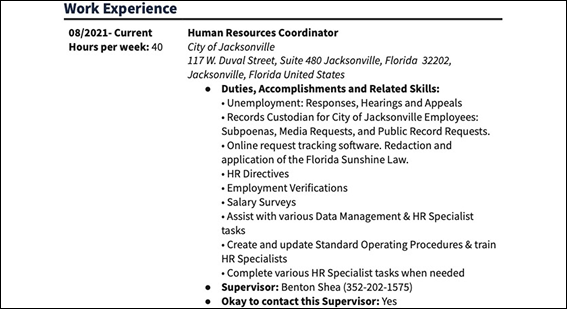
First design iteration of the resume template - Work experience
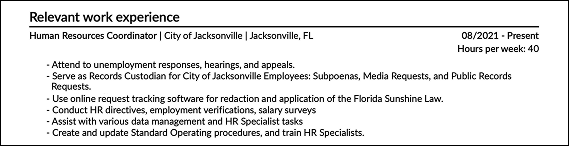
Redesigned resume template - Work experience
Problem
The two-column layout intended to improve entry separation and date visibility in the Work Experience and Education sections creates excess white space, and reviewers prefer the remaining section content to span the full page width.
Design solution
Retained the two-column format only at the top to keep dates and hours aligned with the job title or school, while allowing the remaining content to span the full width for readability.
Change 3. Clarify where certifications should be listed
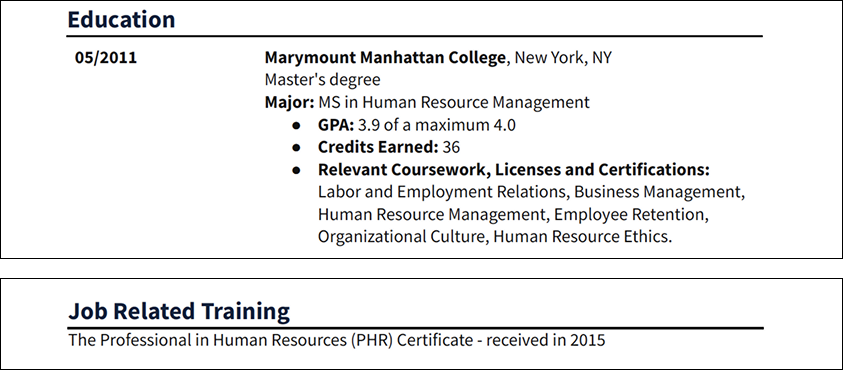
First design iteration of the resume template - Education and Job related training

Redesigned resume template - Education
Problem
Certification information is often entered in either the Education or Job-Related Training sections, indicating user confusion about where it belongs. As a result, resume reviewers must check both sections when a position requires a certification. This issue stems from overlapping labels, as the Education section includes a “Relevant coursework, licenses, or certifications” field and the Job-Related Training title also implies they belong there.
Design solution
Updated the Education section title to “Education, certification or licensures” to better guide users adding certification information and to make it more specific than the Job-Related Training section.
Change 4. Move federal job details to the top for visibility
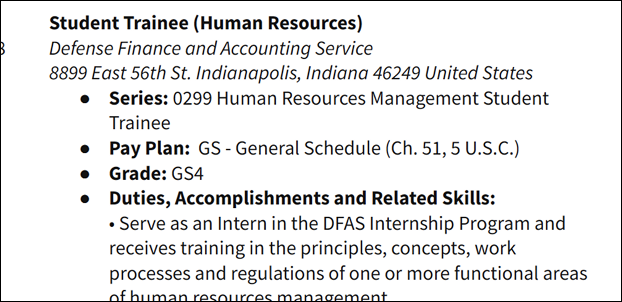
First design iteration of the resume template - Federal work details
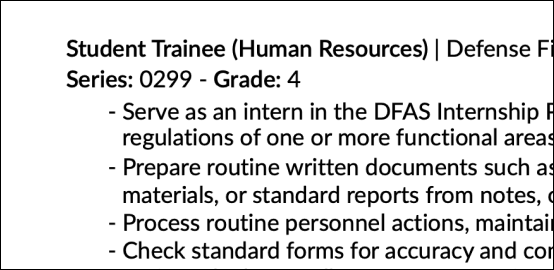
Redesigned resume template - Federal work details
Problem
Pay plan, grade, and series details that help reviewers identify federal work experience are not prominent when located a few lines below the job title. Reviewers also do not need the full names of these selections (e.g., “General Schedule” or the full series name).
Design solution
Streamlined the federal job classification fields to series and grade only, shortened the section details displayed on the template, and moved the information right below the job title with clear headers for quick visibility.
Change 5. Label education details for clarity
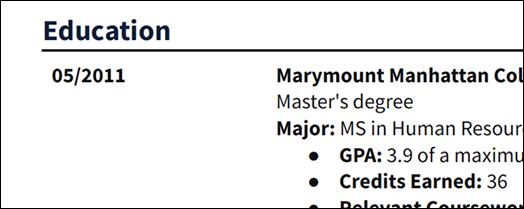
First design iteration of resume template - Education date
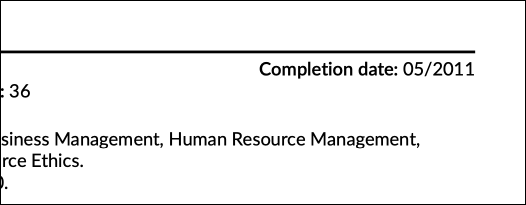
Redesigned resume template - Education date
Problem
While resume reviewers find most Work experience details intuitive without labels, the Education section is less clear. Dates are especially ambiguous, as it is not obvious whether they refer to degree conferral or program completion.
Design solution
Added a “Completion date” label in the Education section for clarity. While many labels in other sections were removed to maximize space and improve readability, the Education section retained most labels due to the importance of its details.
Additional space-saving updates decided at the program-level:
Removed full employer addresses (kept city and state) since physical mailing is no longer required.
The resume’s margins, font size, and spacing were set to the minimum levels acceptable under standard conventions and accessibility regulations to maximize space.
Redesigned Resume Builder tool
Testing the Resume Builder tool with job seekers led to enhancements focused on labeling and navigation.
Change 1: New links to improve discoverability
“I am not seeing it right away here...It’s pretty non-intuitive.”
“It seemed logical to look in the profile section because it has all my basic information. I clicked it thinking it would take me to the resume builder, but it wasn’t quite what I was expecting. ”
Problem
Participants experience difficulty locating the Resume Builder on USAJOBS, particularly after creating a profile. It is not intuitive how to access the tool from the landing page or the Profile page, where resume-related information is stored.
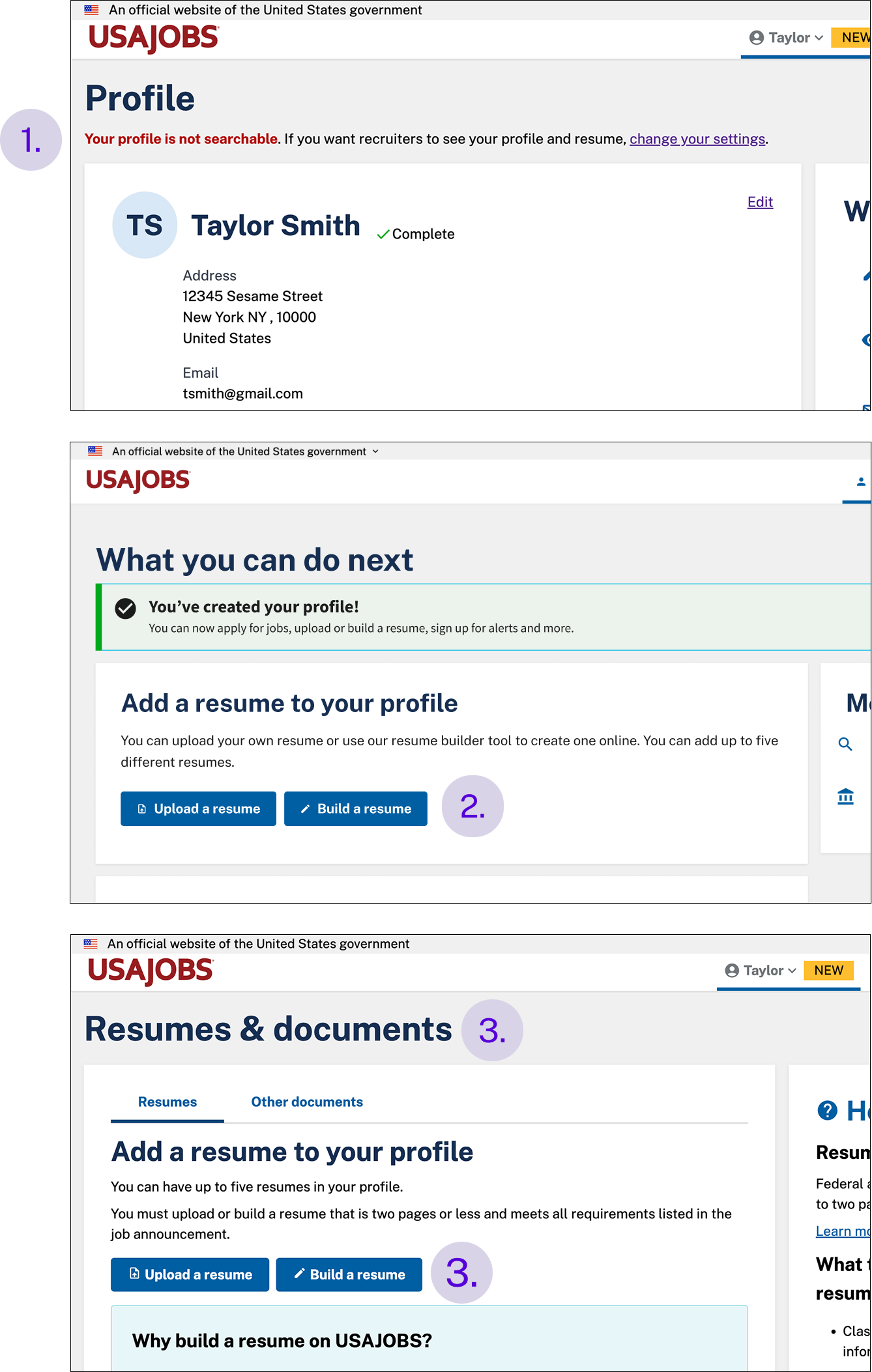
Newly designed Resume Builder links
Design solution
Added a new link to the Resume Builder on the Profile page, where many participants expected to find it, along with messaging that indicates whether the user’s profile and resume are searchable.
Added a link to the Resume Builder on the What you can do next page, which users see after creating an account.
Updated the page title where resumes are managed from “Documents” to “Resumes and documents,” and separated the Upload a resume and Build a resume options into large, distinct buttons.
Change 2: Clarify the Resume Builder’s benefits
“If it’s required for the application process, otherwise I’d use my own resume”
“If I were fresh out of college, I might use the Resume Builder as a starting point. It prompts you to include important details you might forget on your own.”
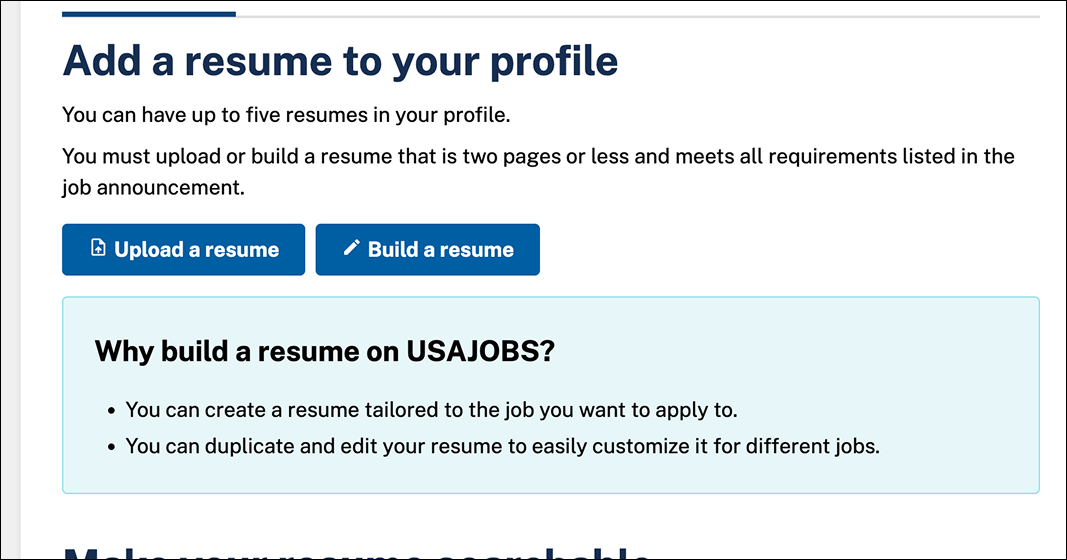
Redesigned Resumes and documents page - tool description
Problem
Many job seekers do not understand the benefits of the tool and plan to use it only if required for a job application or when creating a resume from scratch. Most prefer uploading a resume they did not create with the tool.
Design solution
Added a simple, clear explanation of the Resume Builder’s benefits next to the tool link, noting that it is easy to edit and duplicate for different jobs.
Change 3: Contextual guidance to make resumes searchable
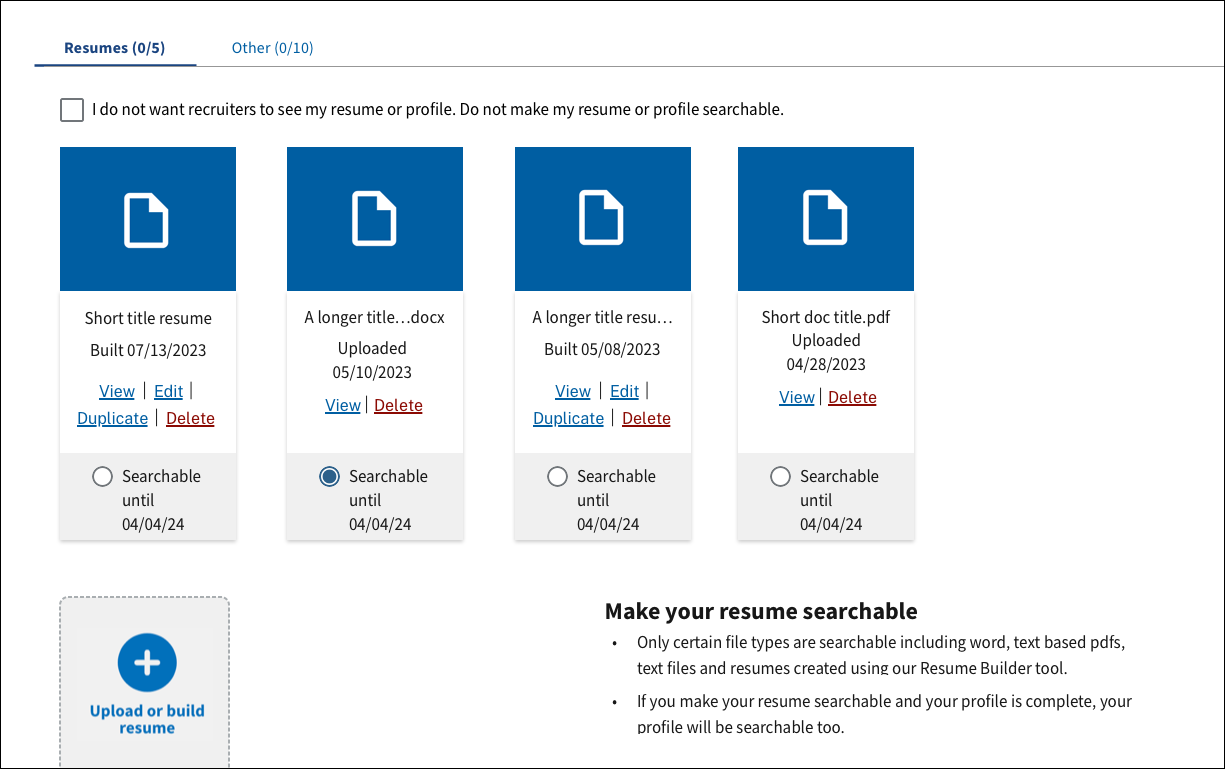
Legacy Resumes and documents page - resume search content
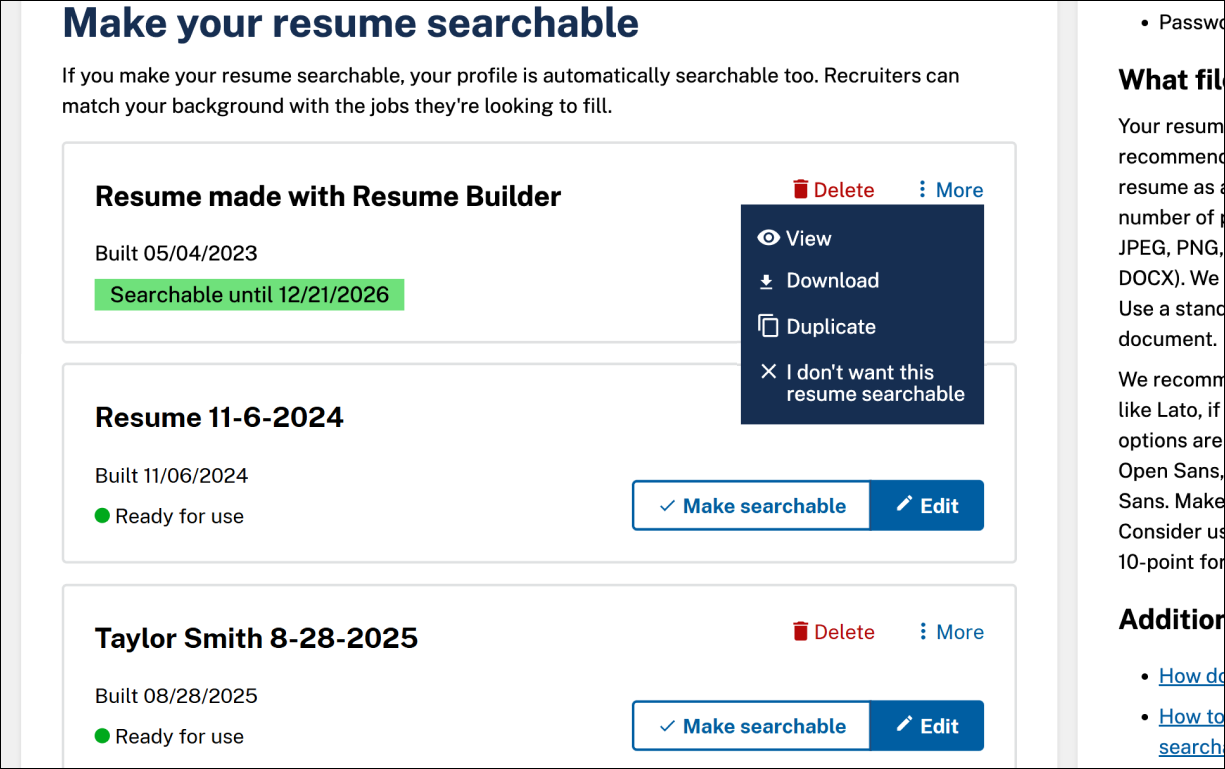
Redesigned Resumes and documents page - resume search content
Problem found
Instructions for making resumes searchable by recruiters are located far from the actions that enable them and are not clearly labeled. While job seekers understand the general concept, they want clearer explanations and more contextual controls to feel confident using this feature.
Design solution
Updated the instructions to clarify what resume searchability means and positioned them before the related controls. Redesigned the document cards and page layout to make the controls for enabling resume searchability more intuitive.
Change 4: Streamline work experience fields
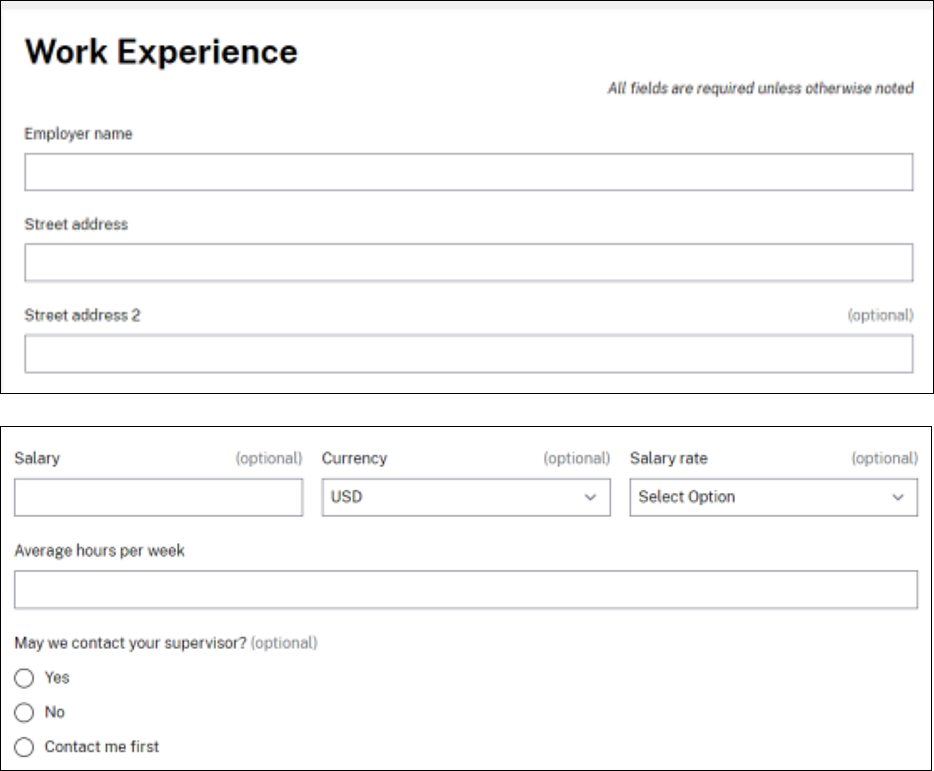
Legacy Resume Builder tool - Work experience
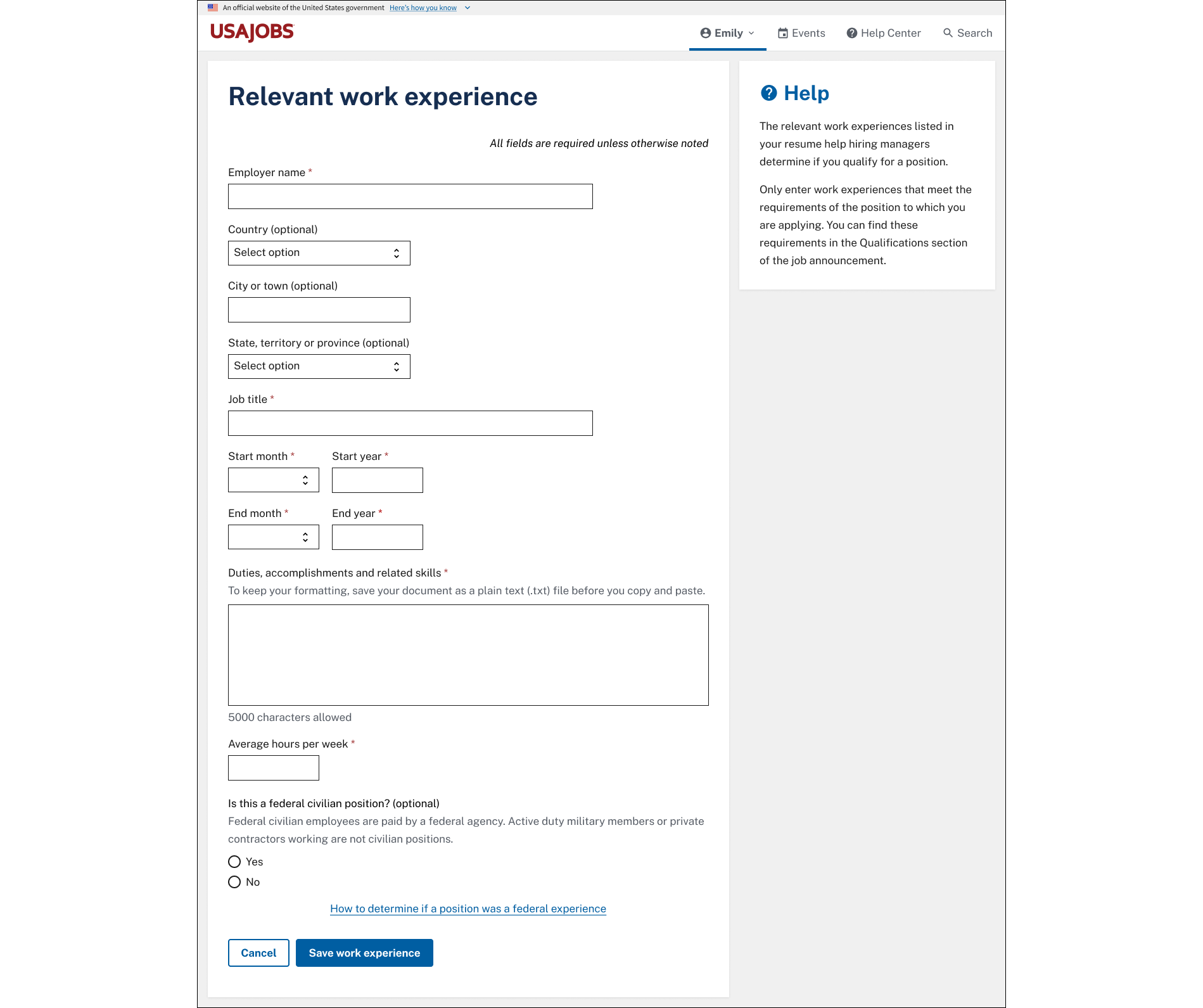
Redesigned Resume Builder tool - Work experience
Problem
Job seekers are unsure why Work Experience has salary, employer street address, and supervisor fields, as they seem irrelevant to applications and raise privacy concerns.
Design solution
Removed salary, employer address, and supervisor fields after program review to align with private-sector resume practices, as they were no longer required for verification, physical mailing, or references during the resume review process.
Reflection
I reconfirmed that user experience design principles can be applied to any product, even as simple as a resume document. Even small formatting changes can improve readability and usability.
A limitation of this project was that mobile testing of the Resume Builder was not conducted due to UserTesting’s lack of mobile support. Future research should prioritize assessing the mobile experience, as most USAJOBS users access the site via mobile devices.
Future considerations
A few suggestions from the study that were deemed out-of-scope may be considered in the future, including:
•AI resume-building features
Competitors like LinkedIn and Indeed offer AI-powered resume suggestions. Future work should assess how similar features could function for USAJOBS and how FEDRamp approval requirements would apply.
•Restructure dense fields
Some fields still accept multiple types of input, such as the “Duties, accomplishments, and skills” field in Work Experience. These could be broken into distinct fields to improve clarity.